
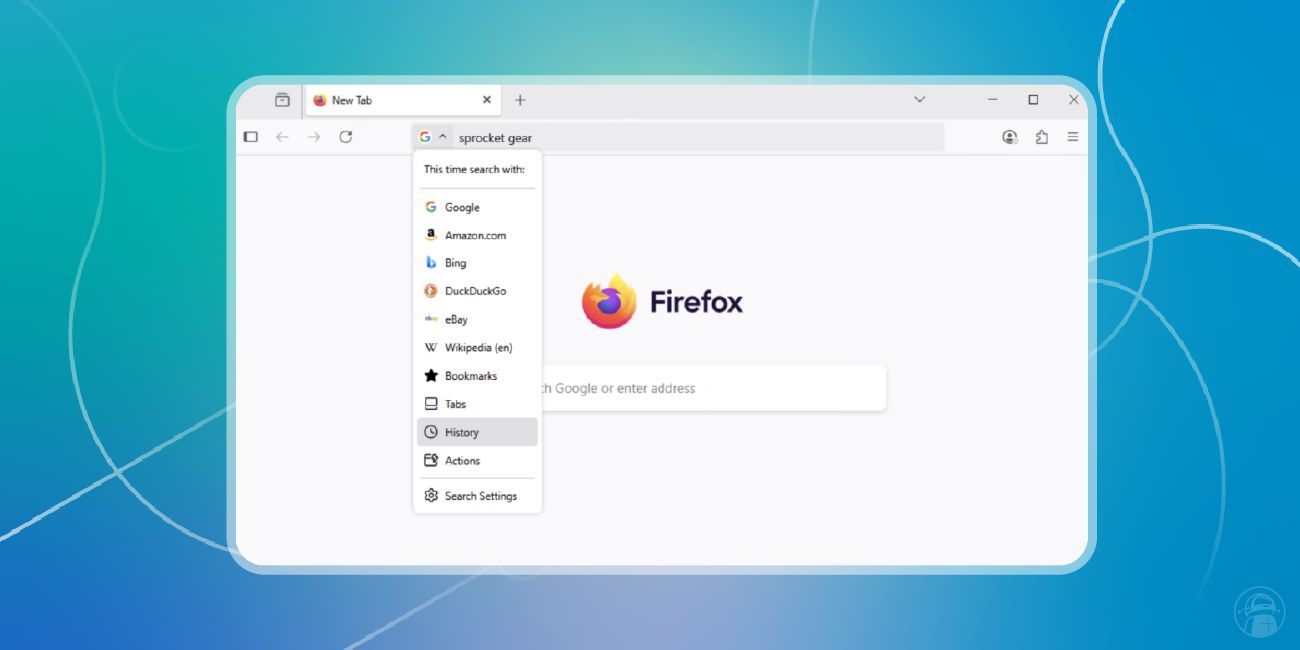
Mozilla has released Firefox 138, bringing a major upgrade to the browser’s address bar—with a focus on speed, control, and smarter in-bar interactions.
🔹 New Search Button & Engine Switcher
Quickly toggle between search engines or modes without leaving the address bar. It’s now easier to refine queries and streamline your search flow.
🔹 Preserved Queries
Firefox no longer overwrites your original query with the results page URL. Your typed text stays visible—making it easier to refine searches or switch engines on the fly.
🔹 Expanded Command Support
You can now type natural-language commands like:
-
clear history -
open downloads -
take a screenshot
These commands trigger browser actions immediately—turning the address bar into a fast command launcher.
🔹 Smart Suggestions & Shortcuts
Use @bookmarks, @tabs, @history, and @actions to search within your own data. Firefox also now shows contextual buttons like:
-
“Search this site”
-
“Switch to tab”
🔹 Security UI Refinements
To reduce visual clutter, Firefox hides https:// by default for secure connections—only showing it when the connection is insecure.