
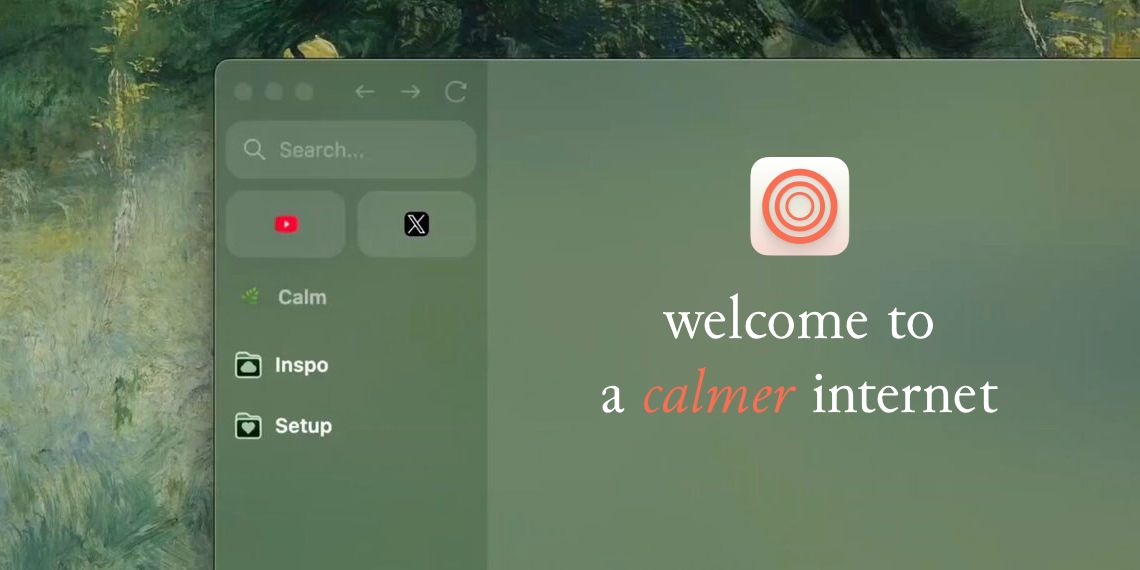
Zen, the Firefox-based customizable browser, has released version 1.15b featuring the highly anticipated folder functionality that transforms how users organize and manage their browsing sessions. 🚀 This long-requested enhancement addresses a core productivity need for users who juggle multiple projects, research topics, or workflow categories within a single browsing session, bringing Zen closer to competing with specialized tab management solutions.
Comprehensive Folder Management Arrives in Sidebar 📂 Users can now create folders directly from the sidebar interface, assign custom names for easy identification, and organize tabs through intuitive drag-and-drop operations. The folder system includes complete management capabilities allowing users to rename, delete, or rearrange folders to match evolving project structures and workflow requirements. 🎯 This organizational enhancement provides the structured tab management that power users have been requesting, transforming chaotic tab collections into organized, project-based workflows.
Firefox 142 Foundation Brings Latest Security Updates 🔧 Version 1.15b upgrades to Firefox 142 as its underlying foundation, ensuring users receive the latest security patches, performance improvements, and web compatibility updates from Mozilla's development efforts. This foundation update maintains Zen's commitment to staying current with modern web standards while preserving its unique customization capabilities. 🛡️ The Firefox 142 integration ensures that Zen users benefit from Mozilla's extensive security research and web compatibility testing without sacrificing the browser's distinctive features.
Visual Design Receives Monochromatic Polish 🎨 The interface gains a more cohesive appearance through monochromatic icons for spaces and folders, creating visual consistency across the sidebar organization system. A subtle animation during browser updates provides users with clear feedback about system status changes. ✨ These design refinements demonstrate Zen's attention to visual coherence while maintaining the clean, distraction-free browsing experience that attracted users to the platform.
Workflow Intelligence Enhances Tab Behavior 🔄 Third-party domains loaded from pinned or essential tabs now automatically open in separate tabs, preventing workflow disruption when external content attempts to hijack important reference pages. This intelligent behavior protects structured workflows from accidental navigation changes that could interrupt ongoing projects. 💡 The automatic tab separation feature shows understanding of how users actually work with complex web applications and reference materials simultaneously.
Windows Integration Gets Native Treatment 🖥️ Windows users benefit from improved compact mode appearance with clearer visual separation between the sidebar and window edge, creating a more native Windows application experience. The interface refinements address longstanding visual inconsistencies that made Zen feel less integrated with the Windows desktop environment. 🎪 These platform-specific improvements demonstrate Zen's commitment to feeling native on each supported operating system rather than providing a generic cross-platform experience.
User Experience Issues Receive Targeted Fixes 🔨 Several annoying interface problems get resolved, including the elimination of compact mode twitching when hovering over the URL bar, proper display of pinned tab titles in search results, and resolution of performance problems related to pinned tab preloading during browser startup. These fixes address specific user complaints that affected daily browsing productivity. ⚡ The targeted problem resolution shows responsive development that addresses real user pain points rather than focusing solely on new feature development.
Tab Organization Philosophy Matures 📚 The folder implementation represents a mature approach to tab organization that acknowledges how modern web users actually work with multiple concurrent projects and research streams. Rather than forcing users to adapt to browser limitations, Zen adapts to support natural organizational patterns that users already employ in other productivity tools. 🌐 This philosophical alignment with user behavior patterns positions Zen as a browser designed for knowledge workers and researchers who need sophisticated information management capabilities.
Competitive Positioning Against Tab Management Solutions 🥊 With comprehensive folder support, Zen now competes directly with browser extensions and specialized applications designed for advanced tab management, potentially reducing user dependence on third-party solutions for organization needs. The native integration provides performance and reliability advantages over extension-based alternatives. 🏆 This positioning could attract users currently relying on complex extension combinations to achieve similar organizational functionality in other browsers.
📰 News Summary
🔑 Key Highlights:
- 🌟 Zen browser version 1.15b introduces long-requested folder functionality for sidebar tab organization
- 📂 Users can create, name, and manage folders with drag-and-drop tab organization capabilities
- 🔧 Updated to Firefox 142 foundation providing latest security and compatibility improvements
- 🎨 Interface refined with monochromatic icons and subtle update animations for visual consistency
- 💡 Third-party domains from pinned tabs automatically open separately to protect workflows
- 🖥️ Windows compact mode receives native appearance improvements with clearer sidebar separation
- 🔨 Multiple user experience fixes including URL bar hover twitching and pinned tab performance issues
- 📚 Folder system addresses productivity needs of users managing multiple concurrent projects and research streams