
Microsoft is quietly working to address long-standing dark mode inconsistencies in Windows 11 through incremental improvements discovered in recent preview builds, though the efforts highlight the persistent challenge of achieving visual cohesion across the operating system. 🔧 These changes represent Microsoft's ongoing struggle to modernize an operating system built on decades of legacy components while maintaining backward compatibility and user familiarity.
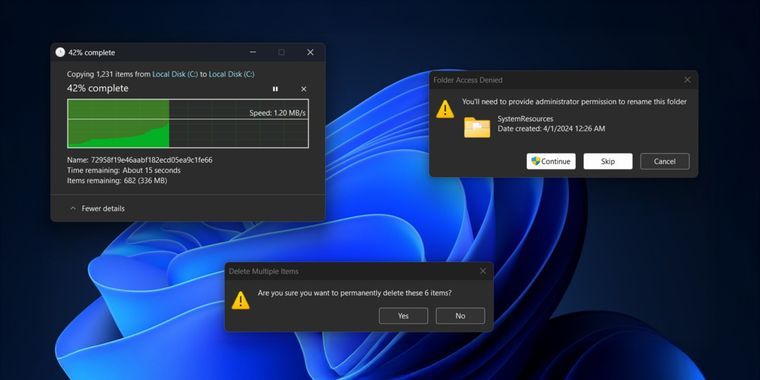
File Operation Dialogs Finally Embrace Dark Theme 📁 The most noticeable improvement brings dark backgrounds to file operation dialogs for copying, moving, and deleting files, replacing the jarring light theme that previously broke dark mode immersion during routine file management tasks. This change creates a more uniform visual experience for users who have embraced dark mode as their preferred interface theme. ✨ The file dialog updates address one of the most frequently encountered dark mode inconsistencies that users face during daily Windows operations.
Implementation Remains Frustratingly Incomplete ⚠️ Despite the dark background improvements, the updated dialogs retain light-colored action buttons that continue to disrupt the cohesive dark theme experience, demonstrating Microsoft's incremental approach to interface modernization. This partial implementation reflects the technical and design challenges involved in updating complex system components without breaking existing functionality. 🎭 The incomplete execution highlights how Microsoft's cautious update strategy often results in mixed visual experiences that satisfy neither consistency nor legacy compatibility goals completely.
Stealth Development Suggests Cautious Rollout Strategy 🕵️ Microsoft has not officially announced these dark mode improvements, indicating they are being quietly tested in preview releases before potential inclusion in broader system updates. This stealth approach allows Microsoft to gather feedback and refine implementations without creating user expectations for features that might be delayed or modified. 🔄 The undocumented development process reflects Microsoft's learned caution about promising interface changes that prove technically challenging to implement consistently.
25H2 Update Expected to Deliver Changes 📅 These dark mode enhancements are anticipated to arrive with the Windows 11 25H2 update later this year, though Microsoft's history of feature delays and incomplete implementations suggests users should temper expectations about comprehensive dark mode coverage. The 25H2 timeline provides Microsoft with additional development time to address the remaining light-colored elements and expand dark mode support to additional system components. ⏰ The extended development timeline acknowledges the complexity of achieving visual consistency across Windows' diverse interface elements.
Legacy Components Remain Stubbornly Light 🏛️ Critical legacy components including the Control Panel, Run prompt, and file properties windows continue to display in light mode with no apparent plans for dark theme integration, perpetuating the inconsistent visual experience that has defined Windows for years. These holdover components represent the deeper challenge of modernizing an operating system while maintaining compatibility with decades of existing software and user workflows. 💡 The persistent light mode components serve as stark reminders of Windows' layered architecture and the technical debt accumulated over multiple generations of the operating system.
Characteristic Design Inconsistency Continues 🎨 The partial dark mode improvements exemplify Microsoft's long-running struggle to deliver cohesive visual design across Windows, a challenge that has become almost characteristic of the operating system's identity. Users have grown accustomed to encountering jarring theme switches and inconsistent interface elements during routine system interactions. 🔀 This design inconsistency reflects the fundamental tension between innovation and compatibility that defines modern Windows development priorities.
User Experience Impact Remains Mixed 👤 While the file operation dialog improvements provide tangible benefits for dark mode users, the incomplete implementation and persistent legacy light components ensure that the overall Windows experience remains visually fragmented. Users seeking consistent dark mode experiences continue to encounter interface elements that break immersion and remind them of the operating system's piecemeal modernization approach. 😅 The mixed user experience highlights how incremental improvements can simultaneously represent progress and underscore remaining deficiencies.
Technical Debt Challenges Modern Design Goals ⚙️ The gradual dark mode rollout illustrates the ongoing impact of technical debt accumulated over Windows' long evolution, where modern design aspirations clash with the practical realities of maintaining backward compatibility and system stability. Microsoft must balance user demands for visual consistency against the risks of disrupting established workflows and breaking existing applications. 🏗️ The technical constraints demonstrate how legacy architecture decisions continue to influence contemporary user interface development possibilities.
📰 News Summary
🔑 Key Highlights:
- 🌙 Windows 11 preview builds reveal dark mode improvements for file operation dialogs
- 📁 File copying, moving, and deleting dialogs now display with dark backgrounds for consistency
- ⚠️ Implementation remains incomplete with light-colored action buttons disrupting theme
- 🕵️ Microsoft testing changes quietly in preview builds without official announcement
- 📅 Updates expected to arrive with Windows 11 25H2 release later this year
- 🏛️ Legacy components like Control Panel and Run prompt remain in light mode
- 🎨 Improvements highlight Microsoft's ongoing struggle with visual design consistency
- 👤 Changes address user frustration with jarring theme switches during file operations